Website security is crucial for protecting your data and maintaining visitor trust. A well-secured site also helps with SEO ranking.
With the constant rise in cyber threats, having a robust security plan is more important than ever. This blog post will guide you through a comprehensive website security checklist. Whether you’re a seasoned developer or a beginner, ensuring your website’s security is non-negotiable.
We’ll cover essential steps to protect your site from potential threats. From SSL certificates to content scanning, each aspect of this checklist is designed to fortify your website. By following these guidelines, you can keep your site secure, maintain your online reputation, and provide a safe browsing experience for your users.
Credit: www.wordstream.com
Introduction To Website Security
Website security is crucial. It protects sensitive data. It safeguards user information. Secure websites build trust. They ensure safe browsing. Visitors feel confident. They stay longer. They return often. Search engines favor secure sites. This boosts SEO rankings. Security prevents data breaches. It protects against hackers. Online threats are ever-present. Keeping your site secure is vital.
Many threats target websites. Malware is common. It infects sites silently. Phishing attacks trick users. They steal personal data. SQL injection compromises databases. It allows unauthorized access. Cross-site scripting (XSS) injects malicious scripts. These run on user browsers. Denial-of-service (DoS) attacks overload servers. This makes sites unreachable. Weak passwords are risky. They are easy to crack. Regular updates prevent vulnerabilities. Secure your site. Protect your visitors.
Essential Steps For Website Security
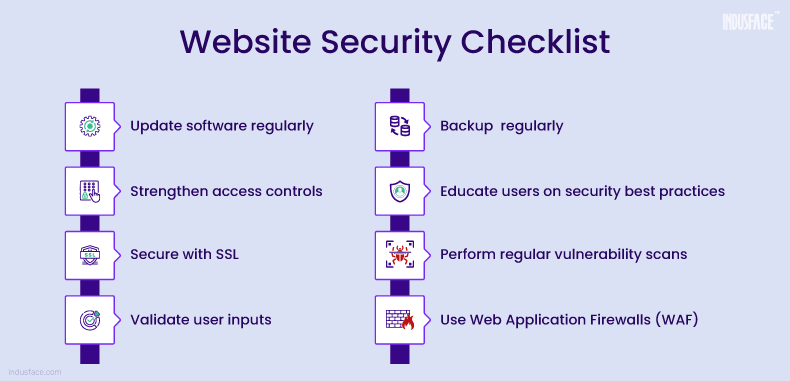
Keeping software up to date is crucial. Outdated software can have security holes. These holes make it easy for hackers to enter. Always update your CMS, plugins, and themes. WP Force SSL can help with SSL security. It ensures your site stays secure. Regular updates are vital for maintaining security.
Using strong passwords can prevent unauthorized access. A strong password has a mix of letters, numbers, and symbols. Avoid using common words or easy-to-guess passwords. Change passwords regularly. Consider using a password manager. This tool helps in creating and storing strong passwords safely. Implementing strong password policies is a simple yet effective security measure.
Securing Your Website With Https
SSL certificates protect your data. They keep information safe from hackers. Visitors trust secure sites more. Google ranks HTTPS sites higher. This means better SEO. SSL certificates help in building trust. They also prevent data breaches. With an SSL certificate, information stays private. This boosts user confidence. It also enhances your site’s credibility.
Start by installing an SSL certificate. Use a plugin like WP Force SSL. It simplifies the process. It scans for mixed content errors. This ensures all pages are secure. The plugin offers real-time SSL monitoring. It checks for over 50 potential errors. A user-friendly interface makes it easy to use. Set up and manage SSL with ease. Protect your site and your users.
Implementing Firewalls And Security Plugins
Protect your site by using firewalls and security plugins. These tools help block threats and keep data safe. Essential for any website security checklist.
Web Application Firewalls (waf)
Web Application Firewalls (WAF) help protect websites from threats. They block malicious traffic. WAFs also monitor and filter HTTP requests. This keeps your site safe from attacks. Many WAFs are easy to set up. They offer different levels of protection. Choose a WAF that fits your needs.
Top Security Plugins For Popular Cms
Security plugins can enhance your website’s safety. For WordPress, consider using WP Force SSL. It simplifies SSL management. This plugin helps prevent mixed content errors. It ensures real-time SSL monitoring. Another good option is Wordfence. It offers firewall protection and malware scanning. For Joomla, RSFirewall! is a strong choice. It provides comprehensive security features. Lastly, for Drupal, try using Security Review. It helps identify and fix security issues.
Regular Backups And Monitoring
Automated backups are crucial. They help to keep your data safe. Use plugins or services that can do this for you. Schedule backups daily or weekly. Store backups in secure places. Cloud storage is a good option. This ensures you can restore your site if needed.
Monitoring your website is key. Use tools to detect security breaches. Respond quickly to any alerts. Fix vulnerabilities as soon as possible. This prevents further damage. Keep your site and plugins up to date. Regular updates patch security holes. Consider using a plugin like WP Force SSL for added security.
Credit: www.indusface.com
Educating Your Team On Security Practices
A website security checklist helps educate your team on essential security practices. It ensures your website stays safe from threats.
Importance Of Security Training
Teaching your team about security is crucial. They need to know how to protect sensitive data. Security training helps prevent breaches. It also builds trust with customers. Educated teams can spot threats quickly. They can take action right away. This reduces the risk of major problems.
Best Practices For Team Members
Team members should use strong passwords. They must change passwords regularly. Avoid sharing login details. Be cautious with email attachments. Always verify the sender. Use two-factor authentication. Keep software updated. Report any suspicious activity immediately. These practices keep your site safe.
Credit: www.wordstream.com
Frequently Asked Questions
What Is The Web Security Checklist?
A web security checklist includes updating software, using HTTPS, strong passwords, regular backups, and vulnerability scanning. Ensure secure coding practices, implement firewalls, and monitor logs.
What Security Does A Website Need?
A website needs SSL certificates, regular updates, strong passwords, firewalls, malware scanning, and backups for security.
What Are Web Security Requirements?
Web security requirements include strong passwords, regular software updates, data encryption, secure coding practices, and user authentication. Implementing firewalls and antivirus software is also essential.
What Are The Indicators That A Website Is Secure?
A secure website has HTTPS, a padlock icon in the address bar, a valid SSL certificate, and updated security protocols.
Conclusion
Ensuring website security is crucial for protecting your data and visitors. WP Force SSL simplifies SSL management, making your site safer and more reliable. This plugin’s features help maintain security and improve user trust. Visit WP Force SSL to learn more. Make security a priority today.
