Ensuring your website’s security is crucial. Cyber threats are everywhere, and they can harm your site in many ways.
In today’s digital age, website security is not optional; it’s essential. Hackers and bots continuously search for vulnerabilities, looking to exploit unprotected sites. Protecting your website helps maintain your reputation and keeps your data secure. That’s why using tools like WP Login Lockdown can make a difference. This WordPress plugin offers a range of features to guard your site against malicious attacks. From cloud blacklists to customizable login pages, it simplifies security management. As we dive into this topic, you’ll discover the importance of securing your website and how WP Login Lockdown can help.
Introduction To Website Security
Website security is a crucial aspect of maintaining a successful online presence. It protects your site, data, and users from potential threats. Understanding the importance of website security is the first step in safeguarding your digital assets.
The Importance Of Securing Your Website
Ensuring the security of your website is vital for several reasons:
- Data Protection: Keep sensitive information safe from unauthorized access.
- User Trust: A secure website builds trust with your audience.
- Search Engine Ranking: Search engines favor secure sites, improving your SEO.
- Compliance: Meet legal requirements and avoid penalties.
Common Threats To Website Security
Understanding common threats can help you take preventative measures. Here are a few:
| Threat | Description |
|---|---|
| Malware | Malicious software that can damage or gain unauthorized access to your site. |
| Phishing | Tricking users into providing sensitive information. |
| SQL Injection | Exploiting vulnerabilities to execute harmful SQL commands. |
| Brute Force Attacks | Attempting to guess passwords through automated means. |
| Cross-Site Scripting (XSS) | Injecting malicious scripts into web pages viewed by users. |
Implementing a robust security solution like WP Login Lockdown can help mitigate these threats. This WordPress plugin offers comprehensive features to protect your site:
- Cloud Blacklists: Maintain blacklists and whitelists with a single click.
- Bot Protection: Block bots from accessing your login form or entire site.
- Firewall: Lightweight, server-level protection against various threats.
- Customizable Login Page: Choose from templates or customize your login page.
- Editable Login URL: Change the login page URL to keep it private.
- Detailed Log: Track users with their IP addresses and other information.
- Centralized Dashboard: Manage all purchases, licenses, sites, and Cloud Blacklists from one location.
Secure your website effectively with WP Login Lockdown and enjoy peace of mind knowing your site is protected from potential threats.
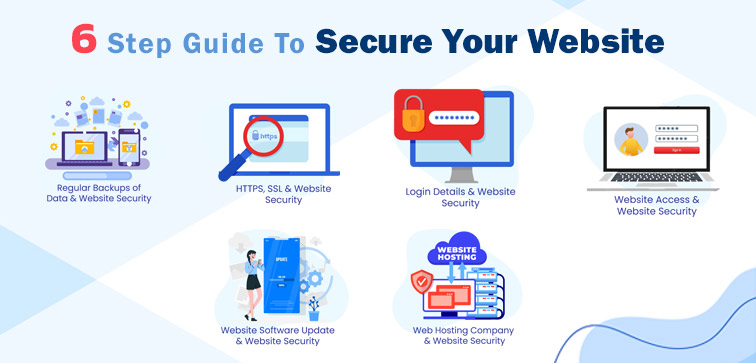
Credit: www.midaswebtech.com
Implementing Strong Authentication Mechanisms
Strengthening your website’s authentication mechanisms is essential. It not only protects user data but also secures the website from unauthorized access. One effective way is to implement strong authentication mechanisms. Let’s explore some key aspects of this approach.
Benefits Of Multi-factor Authentication (mfa)
Multi-Factor Authentication (MFA) adds an extra layer of security. This means users need more than just a password to access their accounts. Here are some benefits:
- Enhanced Security: Even if a password is stolen, access still requires a second factor.
- Reduced Risk of Unauthorized Access: MFA makes it harder for attackers to gain access.
- Improved Compliance: Many regulations require MFA for sensitive data protection.
- Peace of Mind: Users feel more secure knowing their accounts have extra protection.
Best Practices For Password Management
Effective password management is crucial. Here are some best practices:
- Use Strong Passwords: Combine upper and lower case letters, numbers, and symbols.
- Change Passwords Regularly: Update passwords every 3-6 months to enhance security.
- Avoid Common Passwords: Do not use easily guessable passwords like “123456” or “password”.
- Use Password Managers: Tools like LastPass or 1Password help manage complex passwords securely.
- Enable Account Lockout Mechanisms: Limit the number of login attempts to prevent brute force attacks.
With the WP Login Lockdown plugin, implementing strong authentication mechanisms becomes easier. It offers features like bot protection, editable login URLs, and customizable login pages. Users can also maintain cloud blacklists and track login attempts through detailed logs. This plugin simplifies security management, making it an excellent choice for securing WordPress sites.
Using Secure Socket Layer (ssl) Certificates
Securing your website is crucial in today’s digital landscape. One effective way to achieve this is by using Secure Socket Layer (SSL) certificates. SSL certificates help protect the data transmitted between your website and its users, ensuring a safe browsing experience. Let’s dive into how SSL certificates work and their benefits for your website.
How Ssl Certificates Work
SSL certificates create an encrypted connection between the user’s browser and your web server. This encryption ensures that any data exchanged remains private and secure. Here’s a step-by-step breakdown of how SSL certificates work:
- The user’s browser requests a secure connection to your server.
- Your server responds by sending a copy of its SSL certificate.
- The browser checks the certificate’s validity and trustworthiness.
- If the certificate is trusted, the browser generates a session key and encrypts it with the server’s public key.
- The server decrypts the session key and establishes a secure connection.
This process ensures that sensitive information, such as login details, remains protected from potential threats.
Advantages Of Ssl For Your Website
Implementing SSL certificates on your website offers several significant advantages:
- Enhanced Security: SSL encrypts data, protecting it from hackers and eavesdroppers.
- Trust and Credibility: SSL certificates display a padlock icon in the browser, assuring users that their data is secure.
- SEO Benefits: Search engines like Google favor websites with SSL certificates, potentially improving your search rankings.
- Compliance: SSL helps you comply with data protection regulations such as GDPR.
- Improved Conversion Rates: Users are more likely to trust and complete transactions on secure websites.
| Advantage | Description |
|---|---|
| Enhanced Security | Protects data from hackers and eavesdroppers |
| Trust and Credibility | Displays a padlock icon, assuring users of data security |
| SEO Benefits | Potentially improves search rankings |
| Compliance | Helps comply with data protection regulations |
| Improved Conversion Rates | Increases user trust and transaction completion |
Integrating SSL certificates is a vital step in securing your website and building trust with your users. By implementing SSL, you not only protect sensitive information but also improve your website’s overall performance and reputation.
Credit: www.elegantthemes.com
Keeping Software And Plugins Up To Date
Keeping your website secure involves many steps, but ensuring your software and plugins are always up to date is one of the most critical. Outdated software can lead to significant security vulnerabilities that malicious actors can exploit. Regular updates help close these gaps, providing better protection for your website.
Risks Of Outdated Software
Outdated software and plugins can pose severe risks to your website’s security. Here are some of the key dangers:
- Security Vulnerabilities: Hackers often exploit known security flaws in outdated software.
- Compatibility Issues: Old software may not work well with newer plugins or themes, causing functionality issues.
- Performance Problems: Updated versions often include performance improvements. Using outdated software can slow down your website.
- Data Loss: Outdated software increases the risk of data breaches, leading to potential data loss or theft.
Automated Tools For Regular Updates
Keeping software and plugins up to date can be a daunting task, especially if you manage multiple websites. Automated tools can simplify this process:
| Tool | Features |
|---|---|
| WP Login Lockdown |
|
| ManageWP |
|
With tools like WP Login Lockdown, you can streamline the update process while ensuring your website remains secure. This WordPress security plugin offers a centralized dashboard, making it easy to manage updates across all your sites.
Regularly Backing Up Your Website Data
In the digital world, data protection is a priority. Regularly backing up your website data ensures you can recover quickly from unexpected events like cyber-attacks, server failures, or human errors.
A reliable backup strategy helps maintain the integrity and availability of your site. Let’s explore the different types of backups and how to choose the right solution for your needs.
Types Of Backups: Full, Incremental, Differential
Understanding the types of backups is crucial for an effective strategy. Here are the main types:
- Full Backup: This backup type involves copying all your website data. It is comprehensive but can be time-consuming and require significant storage.
- Incremental Backup: This type only copies data that has changed since the last backup. It is faster and uses less storage but requires multiple backups for a complete restore.
- Differential Backup: This involves backing up data changed since the last full backup. It balances the speed and storage needs between full and incremental backups.
Choosing The Right Backup Solution
Selecting the right backup solution depends on your specific needs and resources. Here are some factors to consider:
- Frequency: Decide how often you need to back up your data. High-traffic sites may need daily or even hourly backups.
- Storage: Choose between local, cloud, or hybrid storage based on your security and accessibility requirements.
- Automation: Automated solutions minimize the risk of human error and ensure regular backups.
- Recovery Speed: Ensure the solution allows for quick data recovery to minimize downtime.
For WordPress users, plugins like WP Login Lockdown can be part of a comprehensive security strategy. While it focuses on securing your login form, combining it with a robust backup solution enhances your overall website protection.
Regular backups are not just a safety net; they are a necessity in today’s digital landscape. Implementing the right backup strategy ensures your website remains resilient and operational, even in the face of unexpected challenges.
Credit: sectigostore.com
Monitoring And Responding To Security Incidents
Ensuring the security of your website requires constant vigilance. Monitoring and responding to security incidents is crucial. This includes setting up real-time alerts and knowing the steps to take after a breach. Let’s explore these key aspects in detail.
Setting Up Real-time Alerts
Setting up real-time alerts is essential to stay ahead of potential threats. With WP Login Lockdown, you can monitor your website effectively. The plugin provides detailed logs, tracking users with their IP addresses and other information.
| Feature | Description |
|---|---|
| Cloud Blacklists | Maintain blacklists and whitelists across all your websites with one click. |
| Bot Protection | Block bots from accessing your login form or entire site. |
| Detailed Log | Track users with their IP addresses and other information. |
These features allow you to receive immediate alerts, enabling quick action against suspicious activities.
Steps To Take After A Security Breach
In the unfortunate event of a security breach, it’s vital to act quickly and efficiently. Here are the steps to follow:
- Identify and Isolate: Determine the source and isolate the affected areas.
- Assess the Damage: Evaluate the extent of the breach and what data may have been compromised.
- Inform Stakeholders: Notify all relevant parties, including users, stakeholders, and legal teams.
- Secure Vulnerabilities: Patch any security gaps to prevent future attacks. Use the firewall feature in WP Login Lockdown for lightweight, server-level protection.
- Review and Update Policies: Ensure your security protocols are updated to handle future incidents more effectively.
Implementing these steps can mitigate damage and restore the integrity of your site.
Frequently Asked Questions
How Do I Secure My Website?
To secure your website, use strong passwords, enable HTTPS, regularly update software, install security plugins, and perform regular backups.
Can I Make My Website Secure For Free?
Yes, you can secure your website for free. Use free SSL certificates from providers like Let’s Encrypt.
What Is The Best Security For A Website?
The best security for a website includes using HTTPS, strong passwords, regular updates, firewalls, and security plugins.
How Do I Change My Website To Secure?
To secure your website, install an SSL certificate, update software regularly, use strong passwords, enable firewalls, and keep backups.
Conclusion
Protecting your website is crucial in today’s digital world. WP Login Lockdown offers a simple and effective solution. This plugin provides features like cloud blacklists, bot protection, and customizable login pages. It ensures your site remains secure from various threats. Check out WP Login Lockdown for robust security measures. Visit the affiliate link to learn more and secure your website today.
