Securing your WordPress site is crucial to protect your data and your visitors. An insecure site can face hacks, data breaches, and loss of trust.
So, how do you secure WordPress effectively? In today’s digital landscape, website security is more important than ever. With WordPress powering over 40% of all websites, it’s a prime target for cyber threats. Ensuring your WordPress site is secure involves several steps, from updating plugins to enforcing strong passwords.
One essential tool is SSL (Secure Sockets Layer), which encrypts data between your website and its visitors. WP Force SSL is a powerful plugin designed to simplify SSL management. It offers a user-friendly interface, real-time monitoring, and a content scanner to maintain site security effortlessly. Investing in such tools can safeguard your site, data, and reputation.
Credit: www.elegantthemes.com
Introduction To WordPress Security
WordPress powers many websites today. This makes it a target for hackers. Security is vital to keep your site safe. Protecting data is crucial. Strong security builds trust with users. A secure site performs better. Hackers can steal info or damage your site. This causes loss of trust and revenue. Keeping WordPress secure is easy with the right tools.
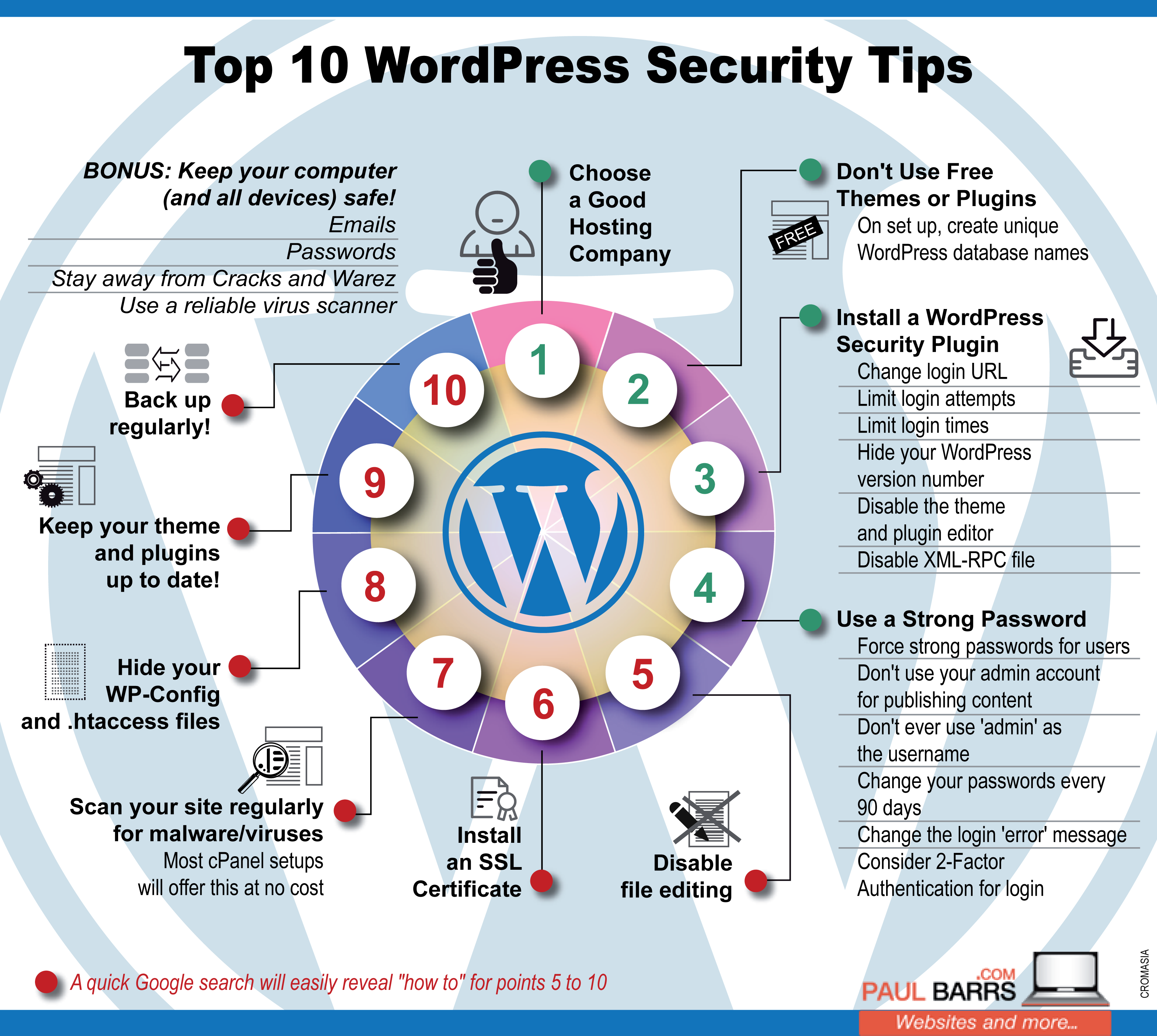
Outdated plugins can be risky. They often have security holes. Weak passwords are easy to guess. This lets hackers in. Insecure themes can be a problem. They might not be updated. Poor hosting services can lead to breaches. Be careful with file permissions. Wrong settings can expose your site. Always update WordPress and plugins. Use strong passwords. Choose secure themes and hosting. Monitor your site for issues. Consider using tools like WP Force SSL to help secure your site.
Regular Updates And Patching
Keeping WordPress Core Updated is essential for security. New updates fix known issues and vulnerabilities. Failing to update can leave your site exposed to threats. Always check for updates and apply them promptly. This keeps your site safe.
Updating Themes and Plugins is also crucial. Outdated themes and plugins can be exploited. Regularly update them to the latest versions. This ensures compatibility and security. Always download themes and plugins from trusted sources. This reduces the risk of malicious code.
Strong Authentication Measures
Two-Factor Authentication (2FA) adds an extra layer of security. It requires two forms of identification. This can be a password and a code sent to your phone. Many plugins offer 2FA, making it easy to set up. Users will need both their password and the code to log in. This makes it much harder for attackers to gain access.
Strong passwords are crucial for security. Use a mix of letters, numbers, and symbols. Avoid common words or easily guessed passwords. Password managers can help create and store strong passwords. Assign user roles carefully. Not everyone needs admin access. Limit roles to minimize risk.
Credit: trendsbird.com
Secure Hosting Environment
Enhance your WordPress security with a secure hosting environment. Regular updates, strong passwords, and reliable plugins protect your website from threats. Choose a hosting provider with robust security measures to safeguard your data.
Choosing A Secure Hosting Provider
Opt for a hosting provider known for strong security measures. Ensure they offer firewalls, malware scans, and regular backups. These features protect against potential threats. Check if they provide DDoS protection. This helps to avoid website crashes. Read reviews and seek recommendations from trusted sources. Verify their uptime guarantee. A reliable host minimizes downtime.
Utilizing Ssl Certificates
SSL certificates are crucial for website security. They encrypt data between your website and visitors. This prevents hackers from intercepting information. Use a plugin like WP Force SSL to manage your SSL certificates. This tool simplifies the SSL setup process. It also offers real-time SSL monitoring and a content scanner. These features ensure continuous protection. The plugin is user-friendly and does not slow down your site. For more information, visit WP Force SSL.
Backup And Recovery Strategies
Secure your WordPress site with effective backup and recovery strategies. Regularly back up your data to prevent loss. Use reliable plugins for automated backups and easy restoration.
Importance Of Regular Backups
Regular backups are crucial for WordPress security. They protect against data loss. If your site gets hacked, you can restore it easily. Backups also help during server crashes. They save time and reduce stress. Always store backups in multiple locations. This ensures safety even if one fails. Automated backups are highly recommended. Many plugins offer this feature.
Best Practices For Backup Management
Use reliable backup plugins for WordPress. Schedule backups to run automatically. Store backups on cloud services like Google Drive. Always test your backups. This ensures they work when needed. Keep multiple versions of your backups. This helps in case the latest one is corrupted. Encrypt your backups for extra security. Regularly update your backup plugins.
Credit: www.paulbarrs.com
Monitoring And Threat Detection
Security plugins are essential for a secure WordPress site. They help in detecting threats and monitoring activities. Plugins like Wordfence and Sucuri offer real-time protection. They scan for malware and block suspicious IPs. Regular updates keep the plugins effective.
Activity logs track changes on your site. These logs record user actions like logins, edits, and deletions. Tools like WP Security Audit Log are useful. Alerts notify you of important events. You get emails or notifications for critical changes. This helps in quick response to potential issues.
WP Force SSL is a comprehensive WordPress plugin designed to streamline the process of configuring and managing SSL certificates. It ensures secure and efficient website operations. The plugin eliminates the need for multiple plugins by offering all necessary SSL tools and options in one place.
| Pricing Plan | Personal Lifetime | Team Lifetime | Agency Lifetime |
|---|---|---|---|
| Price | $59 | $89 | $119 |
| Sites License | 1 | 5 | 100 |
| Features | All current & future features | All current & future features | All current & future features |
| Support | Lifetime updates & support | Lifetime updates & support | Lifetime updates & support |
Frequently Asked Questions
How Can I Secure My WordPress Website?
Secure your WordPress website by using strong passwords, updating plugins and themes, installing security plugins, enabling two-factor authentication, and performing regular backups.
How Do I Keep My WordPress Site Private?
To keep your WordPress site private, use a privacy plugin, set site visibility to private, and require user login. Adjust settings to block search engines, restrict access to registered users, and password-protect pages.
Does WordPress Have Built In Security?
Yes, WordPress has built-in security features. It provides regular updates, strong passwords, and user role management to enhance security.
Can You Password Protect An Entire WordPress Site?
Yes, you can password protect an entire WordPress site. Use plugins like Password Protected or Wordfence for this.
Conclusion
Securing your WordPress site is crucial. WP Force SSL simplifies the process. Its user-friendly interface and comprehensive tools make SSL management easy. The plugin ensures your website remains secure without technical headaches. With real-time monitoring and content scanning, you can prevent potential issues.
Managing multiple sites is straightforward with the centralized dashboard. Invest in WP Force SSL to enhance your website’s security effortlessly. For more details, visit https://wpforcessl. com/. Stay safe and protect your WordPress site today!
